

In today’s busy world, finding enough rehearsal time for your cast can be a challenge. With Show|Ready, your cast can continue rehearsing beyond scheduled rehearsals with flexible, on-demand access to their music. Cast and crew members can rehearse anytime, anywhere, directly from their mobile device, tablet, or computer. Supported devices include Mac, Windows, iOS, and Android.
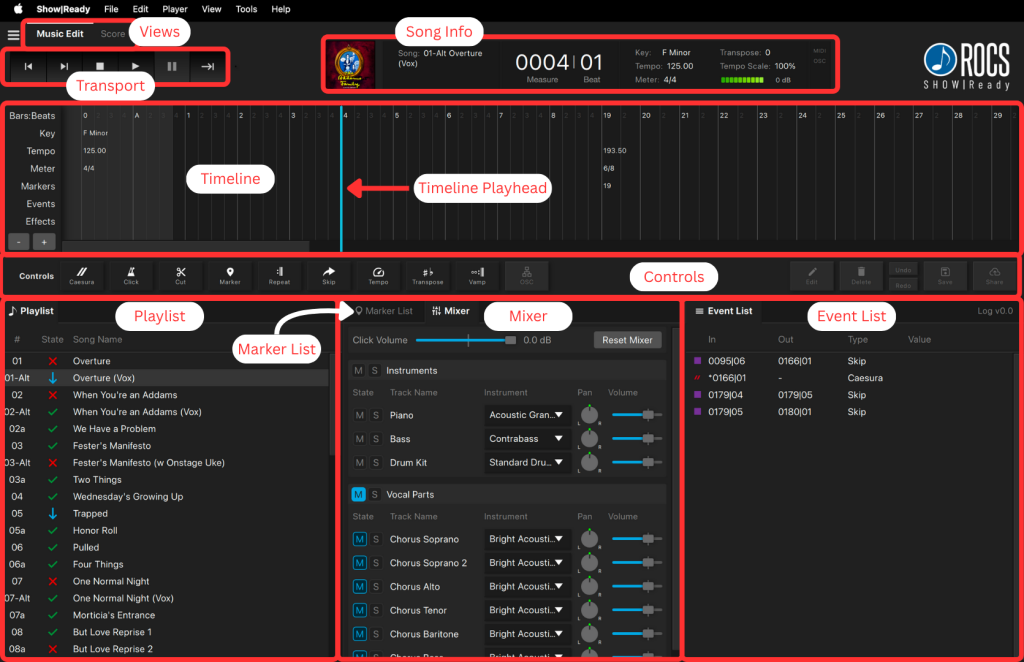
Show|Ready’s intuitive interface makes it easy to customize your rehearsal experience while preserving the show’s integrity as intended by the authors. Approved edits include changing keys and tempos; adding or adjusting cuts, repeats, skips, vamps, caesuras, markers, and click resolution; controlling playback states; and adding OSC commands for QLab integration. These tools provide a curated rehearsal and performance experience enhanced with technology, while ensuring the music remains consistent with approved licensing guidelines.
All shows include piano, bass, drums, click, and vocal-line parts for individuals and ensembles. Rather than traditional guide vocals, Show|Ready uses virtual MIDI instruments to represent vocal lines, helping performers learn notes and harmonies clearly and effectively. Cast members can mute or solo individual parts to focus on exactly what they need to hear during rehearsal. A built-in digital piano/conductor score also allows performers and directors to follow along with the music in real time.
Show|Ready seamlessly integrates with Stage|Tracks, allowing any approved edits made in Show|Ready to appear instantly in Stage|Tracks for rehearsal and performance consistency throughout your production workflow.
To preserve each production’s intended structure and licensing compliance, edits outside the approved tools are not supported. The software does not allow actions such as renaming, reordering, deleting, or adding songs, or creating additional scene-change music.
With over 200 shows available, listen to samples from today’s most popular shows. Our catalog is continually expanding, so if your show isn’t available yet, contact us. We’re always ready to collaborate with you to ensure your production’s success.
Show|Ready Viewer Preview
To download the Show|Ready software on your computer or mobile device, do the following:
- Download Show|Ready.
- Agree to the End User License Agreement.
- Enter the viewer code:
- SOUPS-TIARAS-ORNATE-FACADE-MOON-ZINC
- Click “Activate.”
For more information on how this app works, check out this user manual:

Would you like a complimentary 1-week Show|Ready editor preview?

